 BigBrother
Turn a standard Linux / Unix PC or Raspberry Pi into a CCTV recorder
BigBrother records and live-streams your IP cameras with an intuitive interface, on hardware you can buy anywhere. There's no proprietary recorder to pay for, repair or replace. It's free, open source, and detects people and vehicles.
Version 2.4 was released on 21 September 2026. The code is licensed under the GNU General Public License version 3. The AI Model is licensed under the BigBrother AI Model License.
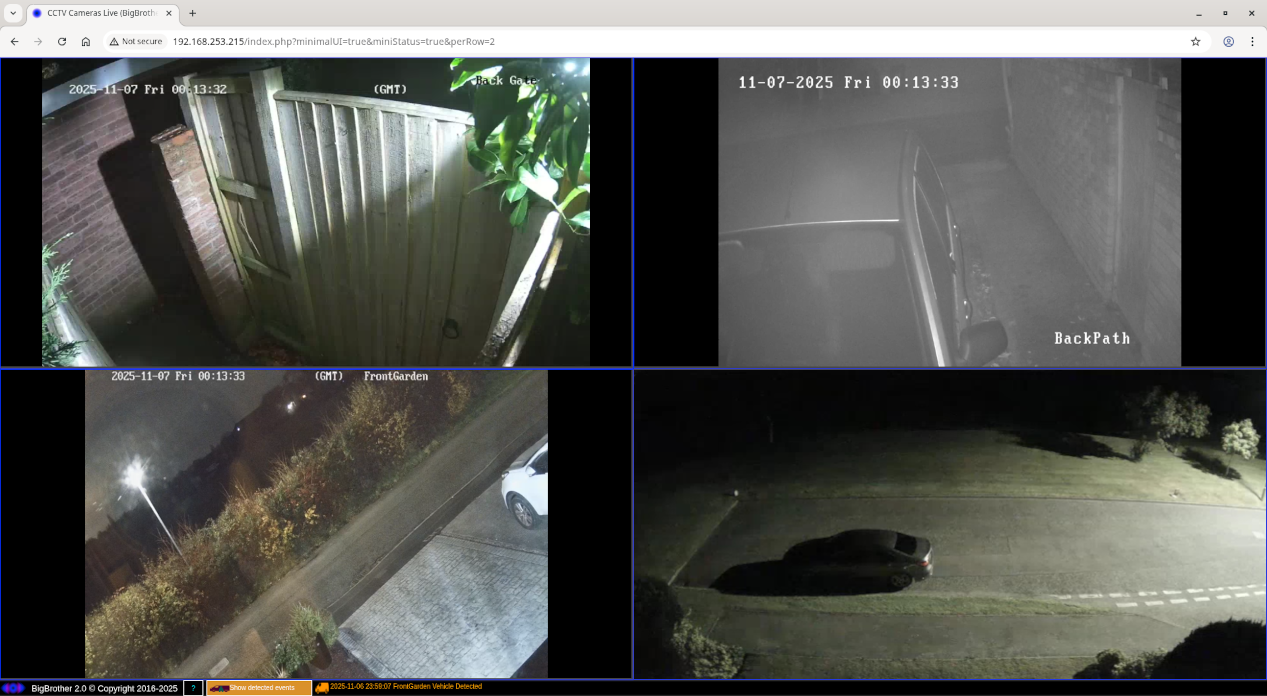
What's included
- Continuous recording, one file per camera per hour
- Automatic retention, rotate after 7 days or keep footage longer
- Live view in any web browser
- RTSP and HTTP cameras over IPv4 and IPv6
- Any ffmpeg codec, including H.264, H.265, VP9 and AV1
- Live view mirroring across VLANs, subnets
- Person and vehicle detection with JPEG snapshots and alerts
- GPU acceleration on supported Nvidia GPUs
- Experimental PTZ control
- Linux, FreeBSD and Raspberry Pi OS
- Scales across servers with no license fees
- Free and open source under the GPL (AI model under separate license)
Why choose BigBrother
Easy to use
BigBrother is built to be simple. Its browser interface is intuitive, with live view, event snapshots and detection alerts in one place, and nothing to install on the device you watch from. That's a real difference from many commercial systems.
Hardware you can buy anywhere
BigBrother runs on a standard PC or a Raspberry Pi. Proprietary NVRs can be expensive to repair or replace. With BigBrother, a failed disk, power supply or whole computer is swapped for ordinary off-the-shelf hardware, and there are no license fees however many cameras or servers you add.
Built on ffmpeg, without the scripting
The open source ffmpeg can record and re-stream just about any video format. Turning that into a simple CCTV system normally takes a lot of custom scripting. BigBrother does that part for you.
Your footage stays yours
Recordings are ordinary MP4 or WEBM or MKV files on the server's filesystem, not a proprietary database or archive format. If you ever stop using BigBrother, your footage is still there, and any player or tool that opens video files can read it. No vendor application required.
Set up in three steps
-
Install the package
BigBrother uses ffmpeg to talk to your cameras. Live view also needs a web server with PHP, such as Apache.
Debian and Raspberry Pi OS
sudo apt install ./org.bigbrothercctv.bigbrother_2.4_all.deb
FreeBSD, as root
pkg add org.bigbrothercctv.bigbrother-2.4.pkg
-
Describe your cameras
Everything is set up in plain text files. A system file and a camera file, with one line per camera, are enough to start recording. Detection and PTZ control each add an optional file of their own. Add as many cameras as your server can handle. Examples are below, and the user guide explains every setting.
-
Start recording
Start the BigBrother service. Each camera then records continuously, one file per hour. Open the web interface from any browser to watch live.
Linux
sudo systemctl start bigbrotherd
FreeBSD, as root
service bigbrotherd start
Prefer to follow along on video? Build an NVR on a Raspberry Pi covers installation and configuration.
What the configuration looks like
Cameras. One line per camera: name, stream URL, group, record by day (D), live view capped at 2 Mbit/s (HLS/2), folder and container. Use * for a column that doesn't apply.
BackGate rtsp://user:password@host:port Back D HLS/2 /cctv/recordings MP4
BackPath rtsp://host:port Back D HLS/2 /cctv/recordings MP4
Detection. One line per camera: name, folder for events, log by day (D), then P for people and V for vehicles, each followed by the times to ignore. [*] means never ignore.
BackPath /cctv/events D P [*] V [*]
BackGate /cctv/events D P [06:00-23:00]
The second line watches for people only between 23:00 and 06:00.
PTZ control (experimental). One line per camera: name, ONVIF address, and True or False for axis reversal. Use onvif:// if your camera uses HTTP and onvifs:// if it uses HTTPS. The host can be an IPv4 or IPv6 address, or a DNS hostname. Put an IPv6 address in square brackets.
CamName onvif://user:pass@host:port True
CamName onvifs://user:pass@host:port False
For more details on configuration see README
How it fits together
ffmpeg talks to your cameras over RTSP or HTTP. BigBrother turns those streams into live viewing and event monitoring in the browser, served by the web server you already run: Apache, lighttpd or Nginx.
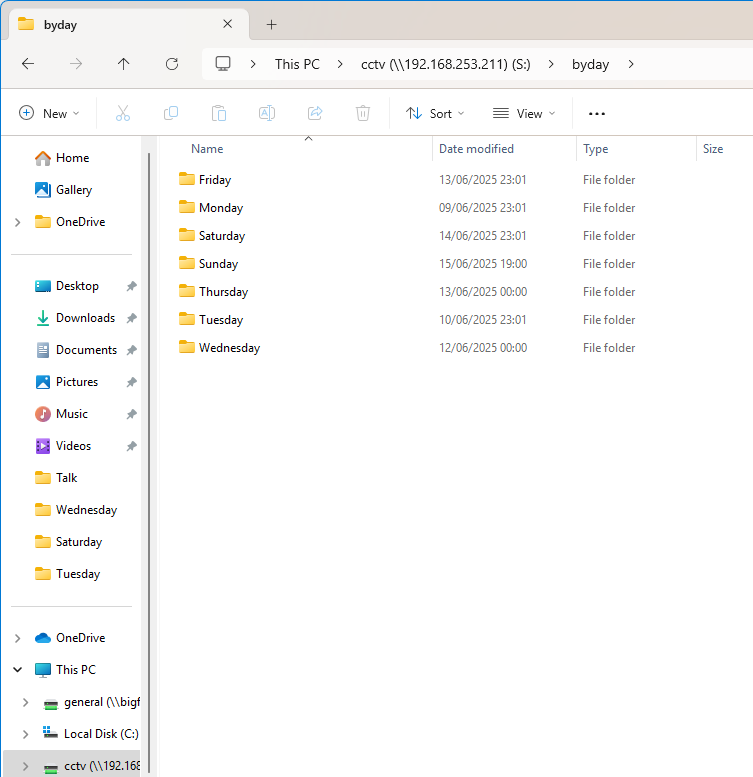
Recordings are ordinary files on the local filesystem, and network access uses standard file sharing: Samba, NFS or WebDAV.
One file per camera per hour
Every camera records around the clock. Files are named by camera, date and time, so finding a moment means opening a single file. Group cameras into folders if it helps, for example one per floor.
BigBrother sorts recordings by day of the week and can delete each day's footage after seven days, so the disk never fills. If you want to keep footage for longer, you can.
Recordings are ordinary files on the server's filesystem. BigBrother follows the Unix philosophy: lots of specialised tools working together, so network access is left to tools built for the job. Set up a Samba, NFS or WebDAV share and reach them from Windows, macOS or Linux. The user guide has step-by-step Samba instructions.
Watch from any browser
Live view uses HTTP Live Streaming, so it works across VLANs and subnets. Put your cameras on their own network and watch from another. Reach it off site through a VPN or a public IP address.
Cap the live bitrate anywhere from 100 kbit/s to 20 Mbit/s so remote viewing never affects what gets recorded.
BigBrother uses 3rd party web server software, such as Apache or lighttpd, so you can restrict access with its built-in authentication.
Version 2.4 adds experimental, unofficial support for controlling PTZ (pan, tilt and zoom) cameras that use ONVIF protocol. It hasn't been tested or approved by ONVIF.
Know when a person or vehicle appears
An AI model detects people and vehicles. Each event is saved as a JPEG snapshot, and the live view shows a visual alert and plays a sound and optionally can announce it using a voice if the browser supports it.
Choose times when detection is ignored, for people and for vehicles, separately on each camera.
Version 2.4 detects events faster and can use supported Nvidia GPUs for hardware acceleration.
Two licenses apply.
The software is GPL 3. The AI models shipped from version 2.3 onwards use the BigBrother AI Model License 1.1. Models shipped before that remain under the GPL.
The licensing FAQ explains the difference.
What it works with
- Cameras
- Anything ffmpeg can connect to over RTSP or HTTP, on IPv4 or IPv6.
- Video and audio
- Any codec ffmpeg supports, including H.264, H.265, VP9, AV1, AAC and Opus.
- Recording formats
- Including MP4 and MKV.
- Operating systems
- Linux and other Unix-like systems, including Raspberry Pi OS and FreeBSD.
- Requirements
- Python, a bash-compatible shell and ffmpeg. Live view also needs a web server with PHP enabled. You can get pre-built static ffmpeg binaries for Linux from an external site.
- Packages
- .deb for Debian and Raspberry Pi OS, and .pkg for FreeBSD. Pre-built packages for RedHat and Rocky Linux aren't available yet because of missing dependencies.
- Scaling
- Need more cameras than one server can handle? Spread them across as many servers as you like. BigBrother and ffmpeg are free, so there are no license fees.
- Licenses
- The code is GPL 3. The detection models use the BigBrother AI Model License 1.1.
Download and documentation
Version 2.4
Documentation
- User guide, plain text
- User guide, PDF
- Software licenseGPL 3. Does not cover the AI models.
- AI Model License 1.1
- Licensing FAQ
- Video: restart recordings from the web interfaceConfiguring BigBrother to allow it
- Video: build an NVR on a Raspberry PiCovers general installation and configuration, so it helps on other platforms too
Latest news
-
Version 2.4. Event detection is faster. Adds hardware acceleration on supported Nvidia GPUs, and experimental, unofficial support for controlling PTZ cameras over ONVIF (not tested or approved by ONVIF). FreeBSD packages are available again.
-
Version 2.3. Faster event detection and live view mirroring. The software remains GPL 3, and the new AI model has its own license.
-
BigBrother AI Model License introduced for the event detection models included with version 2.3 onwards. Models shipped with earlier versions remain under the GPL, and so does the software itself.
-
Version 2.2. Filter the event log and snapshot view, and lower latency for live view mirroring.
-
Version 2.1. Better minimal UI performance, and a fix for recording files that could become corrupted if the server restarted. Event snapshots are now viewable in the mirroring web interface, and an updated AI model improves detection accuracy.
Contact
Send us a message for technical help, questions or suggestions or bug reports